Script BedWars
63 tính năng trong 14 danh mục, cập nhật hằng tuần.
Ngôn ngữ khác:English·Português·Español·Bahasa Indonesia·Filipino
Xem trước script BedWars
Đây là menu ZekeHub thật, được dựng lại để chạy trên trình duyệt. Bạn cứ bấm thử — menu trong game dùng tiếng Anh.

Xem video script BedWars
Roblox BedWars Script | Kill Aura, Aimbot, Scaffold + More (2026) · 29 May 2026
Thêm video về script BedWars

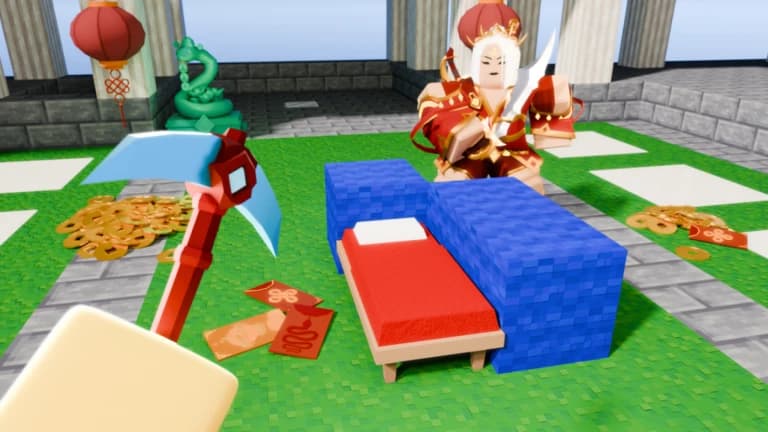
BedWars trên Roblox giữ đúng luật quen thuộc: bảo vệ giường của đội, gom tài nguyên để mua đồ, bắc cầu sang đảo địch, phá giường của họ và trở thành đội cuối cùng còn trụ lại. Kit đa dạng và trận đấu diễn ra rất nhanh, nên chỉ một pha bắc cầu hụt hay một lần rơi xuống void cũng đủ khiến cả đội thua.
Script BedWars của ZekeHub tập trung vào PvP và tốc độ: Kill Aura đánh mọi người chơi trong tầm, Projectile Aimbot và Auto Projectile lo các đòn bắn xa, Scaffold tự đặt block khi bạn đi, Nuker phá block xung quanh. Bạn có thêm Fly, Spider, Anti Fall chống rơi void, Auto Buy, tự mua nâng cấp đội theo thứ tự ưu tiên, Auto Protect Bed, Chest Stealer và ESP giường. Dành cho người muốn kết thúc trận nhanh và gọn hơn.
Script BedWars làm được gì
- Kill AuraTự đánh người chơi xung quanh, lọc theo FOV, tầm nhìn và bỏ qua người cùng clan.
- Projectile AimbotTự ngắm và tự bắn đạn về phía mục tiêu, giảm knockback khi bị trúng đòn.
- ScaffoldTự đặt block dưới chân khi bạn đi, bắc cầu sang đảo khác không cần ngắm.
- NukerTự phá block xung quanh, kết hợp Fast Break để phá nhanh hơn.
- Di chuyểnFly, Spider leo tường, High Jump, Auto Sprint, No Slowdown và Anti Fall chống rơi void.
- Auto BuyTự mua đồ khi đứng gần shop, mua nâng cấp đội theo ưu tiên và mua giáp sớm với Shop Tier Bypass.
- Giường và rươngAuto Protect Bed tự bọc giường bằng block, Chest Stealer lấy sạch đồ trong rương.
- ESP và Bed ESPBox, máu, tên, vũ khí, tracer, chams và ESP riêng cho giường của các đội.
Tất cả 63 tính năng của script BedWars
Tên tính năng được giữ nguyên như trong menu game, bằng tiếng Anh.
Xem tất cả 63 tính năngMở rộngThu gọn
Combat
- Kill Aura — Automatically attack nearby players
- Play Animations — Enable attack animations
- Multi Target — Attack multiple players in range
- Attack Cooldown (0.01s to 2s, default 0.2s) — Seconds between attacks
- Range (1 studs to 25 studs, default 18 studs) — Attack range in studs
- Projectile Aimbot — Automatically aim projectiles
- Projectile Aimbot (default key B)
- Reduce Knockback — Reduce knockback taken
- Knockback Strength (1% to 100%, default 100%)
- Auto Projectile — Automatically fires projectiles at targets
- Fire Delay (0.05s to 1s, default 0.1s) — Delay between shots
- Projectiles (default arrow) — Multi-select projectiles to use when available
- Hit Chance (1% to 100%, default 100%) — Chance to hit target
- Range (1 studs to 200 studs, default 100 studs) — Maximum targeting range
- Target Players — Applies to kill aura, projectile aimbot, auto projectile
- Target Training Dummies
- Include Friendly Dummies
- Exclude Clanmates — Skip players whose ClanTag is in the list
- Excluded Clan Tags — Multi-select, auto-populated from players in server
- Aim Mode — Mouse = nearest cursor, FOV = nearest screen center (launch direction)
- Aim Mode (default FOV)
- Use FOV Limit — Only target within the FOV radius
- FOV
- FOV (10 to 500, default 100)
- Visible Check — Only target players with line of sight
- Show FOV Circle
Bridge
- Scaffold — Automatically places blocks while walking
- Bridge Distance (1 to 6, default 3) — How far ahead to place blocks
- Diagonal Bridging — Enables diagonal bridge building
- Downwards Bridging — Enables downwards bridge building
Player
- Fly — Enable flight
- Speed (1 to 50, default 23)
- Vertical Speed (1 to 100, default 40)
- WalkSpeed — Modify movement speed
- Speed Value (0 to 1.6, default 1.5)
- Spider — Climb walls like a spider
- Spider Speed (1 to 100, default 40)
- High Jump — Jump higher
- Jump Power (50 to 300, default 100)
- Auto Sprint — Automatically sprint
- No Slowdown — Remove slowdown effects
- Anti Fall — Prevents falling into the void
- Anti Fall (default key X)
Nuker
- Nuker — Automatically break blocks
- Break Targets (default Beds) — Multi-select what to break
- Show Effects — Show break effects
- Play Animation — Play break animation
- Fast Break — Break blocks faster
- Break Speed (0s to 0.5s, default 0.1s)
- Fast Break (default key F5)
Auto Protect Bed
- Auto Protect Bed — Automatically protect your bed with blocks
Misc
- Fast Drop — Quickly drop items with a custom keybind
- Auto Consume — Automatically consume items
- Health Percent (1% to 99%, default 70%)
- Consumables (default Apple) — Select items to auto consume
- Raven TP — Teleport Raven to random enemy
- Trap Disabler — Automatically disable traps
Auto Buy
- Auto Buy — Auto buy items near shop
- Items to Buy (default Sword) — Multi-select - items to auto buy (default Sword)
- Auto Buy Team Upgrades — Automatically purchase team upgrades based on priority
- Shop Tier Bypass — Lets you buy items like armor early
Inventory
- Auto Chest Stealer — Automatically steal from chests
- Range (0 studs to 18 studs, default 18 studs)
- Visible Check — Only steal from open chests
- AutoHotbar — Automatically arranges your hotbar
- Slot 1 (default none)
- Slot 2 (default none)
- Slot 3 (default none)
- Slot 4 (default none)
- Slot 5 (default none)
- Slot 6 (default none)
- Slot 7 (default none)
- Slot 8 (default none)
- Slot 9 (default none)
Auto Pickup
- Auto Pickup — Automatically pickup items
- Range Value (1 to 15, default 10)
Auto Queue
- Auto Queue — Automatically queue for games
- Game Mode — Select game mode to queue for
Mod Detector
- Mod/Staff Detector — Toggle staff detection
- Detection Mode (default Notify) — Choose what happens when staff is detected
Esp Options
- ESP — Toggle all ESP
- Show Team — Show ESP on teammates too
- Standard Boxes — Show boxes around entities
- 3D Boxes — Show 3D boxes around entities
- Box Fill — Fill boxes around entities
- Health Bar — Show health bars
- Health Text — Show health text
- Health Bar Outline — Show health bar outline
- Names — Show entity names
- Distance — Show distance to entities
- Weapon — Show held weapons
- Tracers — Show tracers to entities
- Arrows — Show off-screen arrows
- Chams — Show chams
Configuration
- Box Outline — Outline ESP boxes
- Box Fill Transparency
- Box Fill Transparency (0 to 1, default 0.5)
- Chams Fill Transparency
- Chams Fill Transparency (0 to 1, default 0.5)
- Chams Visible Only — Only show chams on players you can see
- Tracer Position
- Position (default Bottom)
- Tracer Outline — Outline tracer lines
- Arrow Outline — Outline off-screen arrows
- Arrow Radius
- Radius (50 to 500, default 150)
- Arrow Size
- Size (5 to 35, default 15)
- Limit Distance — Limit ESP distance
- Max Distance (50 studs to 2000 studs, default 150 studs)
- Use Team Colors — Use team colors for ESP
- Text Size
- Size (8 to 24, default 13)
Bed Esp
- Bed ESP — Show ESP on beds
- Show Distance
- Show Health
- Show Plating
- Text Size (8 to 24, default 13)
- Max Distance (10 studs to 500 studs, default 150 studs)
Câu hỏi thường gặp về script BedWars
01Script BedWars giá bao nhiêu?
£6.99 cho 30 ngày, hoặc £18.99 trả một lần với gói Lifetime. Cả hai đều là hub key ZekeHub, nên bạn dùng được mọi script trong hub chứ không riêng BedWars.
02Scaffold và Nuker dùng để làm gì?
Scaffold tự đặt block dưới chân khi bạn di chuyển, giúp bắc cầu sang đảo khác nhanh hơn. Nuker tự phá block quanh bạn, kết hợp Fast Break để xuyên qua lớp block bảo vệ giường đối thủ.
03Làm sao chạy script BedWars?
Chọn một executor trong danh sách tương thích, mua key ZekeHub, vào một trận BedWars rồi inject executor. Dán loadstring ZekeHub, bấm execute và menu sẽ hiện trong game.
04Script có được bảo trì thường xuyên không?
Có, script được cập nhật hằng tuần. Loader tự lấy phiên bản mới nhất mỗi lần chạy, nên bạn không cần theo dõi hay tải lại file nào.
05Tên tính năng trong menu là tiếng gì?
Tiếng Anh, đúng như danh sách đầy đủ trên trang này: Kill Aura, Scaffold, Auto Protect Bed và các tính năng khác.
More questions? See the full FAQ →