Script Welcome to Bloxburg
67 tính năng trong 22 danh mục, cập nhật hằng tuần.
Ngôn ngữ khác:English·Português·Español·Bahasa Indonesia·Filipino
Xem trước script Welcome to Bloxburg
Đây là menu ZekeHub thật, được dựng lại để chạy trên trình duyệt. Bạn cứ bấm thử — menu trong game dùng tiếng Anh.

Xem video script Welcome to Bloxburg
Bloxburg Script — AUTO STUDENT FARM (Senior = +20% Pay), Instant Teleport & Fast Job Farm · 21 Oct 2026

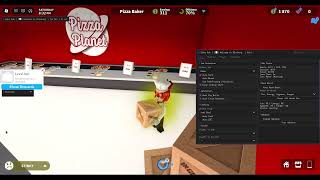

Welcome to Bloxburg là game mô phỏng cuộc sống: bạn đi làm để kiếm tiền, giữ các chỉ số mood không tụt, nâng kỹ năng và dồn tiền xây ngôi nhà mơ ước. Một căn nhà đẹp có thể tốn rất nhiều ca làm, chưa kể thời gian ngồi đặt từng bức tường, từng món nội thất.
Script Bloxburg của ZekeHub tự farm công việc bạn chọn với Fast Mode đi thẳng đến từng điểm, Anti Faint, ca làm không bị kết thúc, tự nghỉ giữa ca và tự về nhà hồi mood rồi quay lại làm. Script còn tự nấu ăn, lên skill, trả hóa đơn, làm Daily Ghosts và Ghost Patrol. Điểm nổi bật là House Builder: copy nhà của người chơi khác, lưu nhà của bạn, xem trước rồi tự xây lại, kèm kho nhà trên cloud tìm theo ID.
Script Bloxburg làm được gì
- Job FarmTự làm công việc đã chọn, Fast Mode đưa bạn và xe đến từng điểm ngay lập tức.
- Auto MoodTự về nhà hồi mood khi xuống dưới ngưỡng rồi quay lại làm, kèm Anti Faint.
- Skill và nấu ănTự lên skill bằng đồ trên plot, tự nấu món đã chọn và tự xử lý QTE khi nấu.
- House BuilderCopy nhà người chơi khác hoặc lưu nhà của bạn, xem trước, ẩn mái, ẩn tường rồi tự xây.
- House DatabaseTải nhà lên cloud, lấy nhà theo ID và lưu về danh sách nhà của bạn.
- Daily GhostsTự tìm đồ cho ghost mỗi ngày, làm cả ngày đã lỡ và chạy Ghost Patrol liên tục.
- Student FarmTự đến lớp và hoàn thành các buổi học ở trường.
- Tiện íchTự trả hóa đơn, webhook báo thu nhập về Discord, Low Graphics và tắt render khi treo farm.
Tất cả 67 tính năng của script Welcome to Bloxburg
Tên tính năng được giữ nguyên như trong menu game, bằng tiếng Anh.
Xem tất cả 67 tính năngMở rộngThu gọn
Job Farm
- Select Job
- Select Job (default Baker)
- Auto Farm — Automatically farm selected job
- Fast Mode — Instantly gets you (and your job vehicle) to each stop instead of walking or driving
- Job Pace (default Legit) — How long to wait at each stop: Legit takes as long as walking/driving would, Fast takes half, Instant goes straight away
- Road Pathfinding (Vehicles) — Only shows when Fast Mode is off - drive job vehicles along the roads instead of taking the fastest route
- Anti Faint — Stops the game sending you home when a mood hits 0
- Never Ending Shift — Stops the game ending your shift when you leave the work area
- Auto Break — Takes breaks between shifts at slightly random times so your playtime looks natural
- Work For (min) (10 to 180, default 45)
- Break For (min) (1 to 60, default 10)
Student Farm
- Student Farm — Automatically attends and completes school classes
- Classes (default Science) — Multi-select - which classes to attend
Auto Skill
- Auto Skill — Levels the chosen skill using items on your plot
- Skill (default Art)
Auto Mood
- Auto Mood — Goes home to boost any mood that drops below the threshold, then goes back to work
- Boost Below % (5 to 100, default 30)
- Moods (default Fun) — Multi-select - which moods to boost
- Boost Moods Now — Manually boost all moods immediately
Cooking
- Auto Cook — Automatically cook selected food
- Food — Populated dynamically
- Auto QTE — Automatically complete cooking QTE events
Automation
- Auto Pay Bills — Automatically pays house bills when due
- Auto Close Paycheck — Hides paycheck notification while auto farming
Webhook
- Enable Webhook — Send earnings to Discord webhook
- Webhook URL — Text input - Discord webhook URL
- Delay (sec) (10 to 300, default 60)
- Test Webhook — Test your Discord webhook
House Builder
- Player to Copy — Choose a player whose house to copy
- Player to Copy — Populated dynamically
- Save As (optional)
- Save As (optional) — Text input - leave blank for auto-name
- Copy Player House — Copy the selected player's house
- Save My House — Save your own house to file
- Select House — Choose a saved house to load
- Select House — Populated dynamically
- Show Preview — Show a preview of the selected house
- Destroy Preview — Remove the house preview
- Hide Roof — Hides the roof on the house preview
- Hide Walls (look inside) — Hides the walls on the house preview so you can see inside it
- Load House — Load the selected house (double-click)
- Delete Selected — Delete the selected house file (double-click)
House Database
- Upload Selected House — Upload the selected house to the cloud database
- House ID
- House ID — Text input - cloud house ID (e.g. bx7k2m)
- Fetch by ID — Fetch a house from the cloud by ID
- Download to Local Houses — Saves the fetched cloud house to your local house list
Build Controls
- Pause Build — Pause the current build
- Abort Build — Abort current build (double-click)
Build Settings
- Build Target — Which plot to build on (you need build permission)
- Build Target (default My Plot)
- Refresh Plots — Refresh the Build Target dropdown
- Use Blockbux Items — Allow placing items that cost Blockbux
- Place Vehicles — Allow placing vehicle items
- Use Inventory Items — Places items you already own from your inventory instead of buying new ones. Only places as many as you have
- Unlock All Gamepasses — Unlocks Advanced Placing no-collision. Floors, large plot, resize and basements stay locked
- Auto-Build Debug Log — Writes one formatted JSON file per build to ZekeHub/Bloxburg/BuildLogs, named after the house and the build time
Daily Ghosts
- Auto Daily Ghosts — Talks to the ghost, fetches its lost item and hands it back. $10,000 per ghost plus Blockbux milestones
- Include Missed Days — Also does ghosts from earlier days. They only pay 25%, but still count toward the milestones
Ghost Patrol
- Auto Ghost Patrol — Rents a Ghost Patrol Cruiser, drives to each ghost, captures 3 and drops them off. Loops forever
Movement
- Auto Sprint — Always run instead of walk
- Low Graphics — Strips materials, textures, shadows and effects and uncaps your FPS
- Disable Rendering — Stops drawing the world entirely for maximum FPS while farming
Teleport
- Select Player — Choose a player to teleport to their plot
- Select Player — Populated dynamically
- Teleport to Plot — Teleport to selected player's plot
- Select Location — Choose a fast travel location to teleport to
- Select Location — Populated dynamically
- Teleport to Location — Teleport to the selected location
Vehicle
- Vehicle Mod — Enable vehicle modifications
- Forward Speed (0.1 to 10, default 1)
- Reverse Speed (0.1 to 10, default 1)
- Turn Speed (0.1 to 10, default 1)
- Suspension Height (0.1 to 5, default 1)
- Max Lean (0.1 to 5, default 1)
- Pitch Change (0.1 to 5, default 1)
Weather
- Time of Day
- Time of Day (default Noon)
- Change Time — Enable time override
Player Stats
- Select Player — Select a player to view stats
- Select Player — Populated dynamically
- View Stats — View selected player's stats (money, moods, skills)
Messages
- Title
- Title (default Alert) — Text input - title of the alert or message box
- Message
- Message (default Message) — Text input - text of the alert or message box
- Send Alert — Send alert box
- Send Message — Send message box
Paycheck
- Job ID
- Job ID (default BensIceCreamSeller) — Text input - job ID shown on the paycheck
- Base Pay
- Base Pay (default 100) — Text input - numeric
- Bonus Pay
- Bonus Pay (default 50) — Text input - numeric
- Show Paycheck — Display custom paycheck
Menu
- Unload — Unload the script
- Menu Keybind
- Menu bind (default key End)
Interface
- Watermark — Shows the stats watermark on screen
- Keybind list — Shows the active keybinds list on screen
Câu hỏi thường gặp về script Welcome to Bloxburg
01Script Bloxburg có trong key ZekeHub không?
Có. Key ZekeHub (£6.99 cho 30 ngày, hoặc £18.99 cho gói Lifetime) mở script Bloxburg cùng mọi script khác trong hub. ZekeHub là dịch vụ trả phí, không có bản miễn phí.
02Copy nhà của người khác như thế nào?
Trong House Builder, chọn người chơi ở mục Player to Copy rồi bấm Copy Player House. Nhà được lưu thành file, bạn có thể xem trước, ẩn mái hoặc tường để nhìn bên trong, rồi dùng Load House để tự xây lên plot. Có tùy chọn dùng đồ sẵn trong kho hoặc cho phép đặt đồ tốn Blockbux.
03Cần những gì để chạy script Bloxburg?
Một executor đang hoạt động (xem trang Executors), key ZekeHub và Bloxburg đang mở trong server. Inject executor, dán loadstring rồi execute, menu sẽ xuất hiện trong game.
04Script có được cập nhật đều không?
Có, ZekeHub cập nhật script hằng tuần. Bạn không cần tải lại gì vì loader luôn lấy bản mới nhất mỗi lần chạy.
05Menu có dùng tiếng Việt không?
Không, menu giữ nguyên tiếng Anh với các mục như Job Farm, Auto Mood hay House Builder. Nếu cần, bạn đối chiếu với phần giải thích tiếng Việt trên trang này.
More questions? See the full FAQ →