Script de Welcome to Bloxburg
67 funciones en 22 categorías, actualizadas cada semana.
También disponible en:English·Português·Tiếng Việt·Bahasa Indonesia·Filipino
Vista previa del script de Welcome to Bloxburg
El menú real de ZekeHub, recreado para el navegador. Haz clic y pruébalo; dentro del juego, el menú está en inglés.

Mira el script de Welcome to Bloxburg en acción
Bloxburg Script — AUTO STUDENT FARM (Senior = +20% Pay), Instant Teleport & Fast Job Farm · 21 Oct 2026

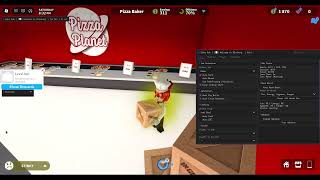

Welcome to Bloxburg es el simulador de vida de Roblox donde trabajas para ganar dinero, cuidas las necesidades de tu personaje y construyes la casa de tus sueños. El problema es que todo cuesta: una casa grande pide mucho dinero, y conseguirlo significa horas repitiendo turnos de repartidor de pizza, cajero o pescador mientras tu ánimo baja. Construir con detalle también lleva su tiempo, sobre todo si quieres copiar un diseño que viste en el plot de otro jugador.
El script de Bloxburg de ZekeHub automatiza el trabajo: eliges un empleo y el auto farm cumple los turnos con Fast Mode, descansos a intervalos naturales y Auto Mood para que tu personaje no se desmaye. También sube skills, cocina, paga las cuentas y completa las clases como estudiante. Su House Builder copia la casa de otro jugador, guarda la tuya y la reconstruye en cualquier plot donde tengas permiso, con una base de datos en la nube para compartir diseños. Es para quien quiere juntar dinero rápido o construir sin pasar horas colocando muebles.
Qué hace el script de Bloxburg
- Auto Farm de trabajosElige un empleo y deja que el script haga los turnos, con Fast Mode para llegar al instante a cada parada.
- House BuilderCopia la casa de otro jugador, guarda la tuya y constrúyela en cualquier plot donde tengas permiso.
- Casas en la nubeSube tus casas a la base de datos y descarga las de otros jugadores con un ID.
- Auto MoodVuelve a casa a recuperar el ánimo cuando baja del límite y regresa al trabajo.
- Skills y cocinaSube habilidades con los objetos de tu plot y cocina la comida que elijas, con los QTE resueltos solos.
- FantasmasCompleta los fantasmas diarios, que pagan $10,000 cada uno, y patrulla con el Ghost Patrol Cruiser en bucle.
- Student FarmAsiste a las clases de la escuela y las completa automáticamente.
- RendimientoLow Graphics y Disable Rendering suben los FPS cuando dejas el farm corriendo por horas.
Las 67 funciones del script de Welcome to Bloxburg
Los nombres de las funciones aparecen tal cual se ven en el menú del juego, en inglés.
Ver las 67 funcionesExpandirContraer
Job Farm
- Select Job
- Select Job (default Baker)
- Auto Farm — Automatically farm selected job
- Fast Mode — Instantly gets you (and your job vehicle) to each stop instead of walking or driving
- Job Pace (default Legit) — How long to wait at each stop: Legit takes as long as walking/driving would, Fast takes half, Instant goes straight away
- Road Pathfinding (Vehicles) — Only shows when Fast Mode is off - drive job vehicles along the roads instead of taking the fastest route
- Anti Faint — Stops the game sending you home when a mood hits 0
- Never Ending Shift — Stops the game ending your shift when you leave the work area
- Auto Break — Takes breaks between shifts at slightly random times so your playtime looks natural
- Work For (min) (10 to 180, default 45)
- Break For (min) (1 to 60, default 10)
Student Farm
- Student Farm — Automatically attends and completes school classes
- Classes (default Science) — Multi-select - which classes to attend
Auto Skill
- Auto Skill — Levels the chosen skill using items on your plot
- Skill (default Art)
Auto Mood
- Auto Mood — Goes home to boost any mood that drops below the threshold, then goes back to work
- Boost Below % (5 to 100, default 30)
- Moods (default Fun) — Multi-select - which moods to boost
- Boost Moods Now — Manually boost all moods immediately
Cooking
- Auto Cook — Automatically cook selected food
- Food — Populated dynamically
- Auto QTE — Automatically complete cooking QTE events
Automation
- Auto Pay Bills — Automatically pays house bills when due
- Auto Close Paycheck — Hides paycheck notification while auto farming
Webhook
- Enable Webhook — Send earnings to Discord webhook
- Webhook URL — Text input - Discord webhook URL
- Delay (sec) (10 to 300, default 60)
- Test Webhook — Test your Discord webhook
House Builder
- Player to Copy — Choose a player whose house to copy
- Player to Copy — Populated dynamically
- Save As (optional)
- Save As (optional) — Text input - leave blank for auto-name
- Copy Player House — Copy the selected player's house
- Save My House — Save your own house to file
- Select House — Choose a saved house to load
- Select House — Populated dynamically
- Show Preview — Show a preview of the selected house
- Destroy Preview — Remove the house preview
- Hide Roof — Hides the roof on the house preview
- Hide Walls (look inside) — Hides the walls on the house preview so you can see inside it
- Load House — Load the selected house (double-click)
- Delete Selected — Delete the selected house file (double-click)
House Database
- Upload Selected House — Upload the selected house to the cloud database
- House ID
- House ID — Text input - cloud house ID (e.g. bx7k2m)
- Fetch by ID — Fetch a house from the cloud by ID
- Download to Local Houses — Saves the fetched cloud house to your local house list
Build Controls
- Pause Build — Pause the current build
- Abort Build — Abort current build (double-click)
Build Settings
- Build Target — Which plot to build on (you need build permission)
- Build Target (default My Plot)
- Refresh Plots — Refresh the Build Target dropdown
- Use Blockbux Items — Allow placing items that cost Blockbux
- Place Vehicles — Allow placing vehicle items
- Use Inventory Items — Places items you already own from your inventory instead of buying new ones. Only places as many as you have
- Unlock All Gamepasses — Unlocks Advanced Placing no-collision. Floors, large plot, resize and basements stay locked
- Auto-Build Debug Log — Writes one formatted JSON file per build to ZekeHub/Bloxburg/BuildLogs, named after the house and the build time
Daily Ghosts
- Auto Daily Ghosts — Talks to the ghost, fetches its lost item and hands it back. $10,000 per ghost plus Blockbux milestones
- Include Missed Days — Also does ghosts from earlier days. They only pay 25%, but still count toward the milestones
Ghost Patrol
- Auto Ghost Patrol — Rents a Ghost Patrol Cruiser, drives to each ghost, captures 3 and drops them off. Loops forever
Movement
- Auto Sprint — Always run instead of walk
- Low Graphics — Strips materials, textures, shadows and effects and uncaps your FPS
- Disable Rendering — Stops drawing the world entirely for maximum FPS while farming
Teleport
- Select Player — Choose a player to teleport to their plot
- Select Player — Populated dynamically
- Teleport to Plot — Teleport to selected player's plot
- Select Location — Choose a fast travel location to teleport to
- Select Location — Populated dynamically
- Teleport to Location — Teleport to the selected location
Vehicle
- Vehicle Mod — Enable vehicle modifications
- Forward Speed (0.1 to 10, default 1)
- Reverse Speed (0.1 to 10, default 1)
- Turn Speed (0.1 to 10, default 1)
- Suspension Height (0.1 to 5, default 1)
- Max Lean (0.1 to 5, default 1)
- Pitch Change (0.1 to 5, default 1)
Weather
- Time of Day
- Time of Day (default Noon)
- Change Time — Enable time override
Player Stats
- Select Player — Select a player to view stats
- Select Player — Populated dynamically
- View Stats — View selected player's stats (money, moods, skills)
Messages
- Title
- Title (default Alert) — Text input - title of the alert or message box
- Message
- Message (default Message) — Text input - text of the alert or message box
- Send Alert — Send alert box
- Send Message — Send message box
Paycheck
- Job ID
- Job ID (default BensIceCreamSeller) — Text input - job ID shown on the paycheck
- Base Pay
- Base Pay (default 100) — Text input - numeric
- Bonus Pay
- Bonus Pay (default 50) — Text input - numeric
- Show Paycheck — Display custom paycheck
Menu
- Unload — Unload the script
- Menu Keybind
- Menu bind (default key End)
Interface
- Watermark — Shows the stats watermark on screen
- Keybind list — Shows the active keybinds list on screen
Preguntas frecuentes sobre el script de Welcome to Bloxburg
01¿Cuánto cuesta el script de Bloxburg?
Se usa con la key de ZekeHub, que vale £6.99 al mes o £18.99 de por vida. No hay una versión gratuita, pero esa key también te sirve para el resto de juegos del hub.
02¿Puedo copiar la casa de otro jugador?
Sí. En House Builder eliges al jugador, copias su casa y la guardas. Antes de construir ves una vista previa, puedes ocultar el techo o las paredes para mirar por dentro, y después la cargas en tu plot usando objetos de tu inventario o decidiendo si incluir los que cuestan Blockbux.
03¿Qué executor necesito para Bloxburg?
Uno de los executors importantes de Roblox; en la página de Executors ves cuáles están funcionando. Entra a tu servidor, inyecta y ejecuta el loadstring de ZekeHub.
04¿Se actualiza cuando Bloxburg cambia?
Sí, el script recibe actualizaciones semanales y el loader siempre carga la versión más reciente sin que tengas que volver a descargarlo.
05¿El menú se ve en español?
No, el menú está en inglés. Las secciones tienen nombres claros como Job Farm, Auto Mood o House Builder.
More questions? See the full FAQ →
Más scripts en español