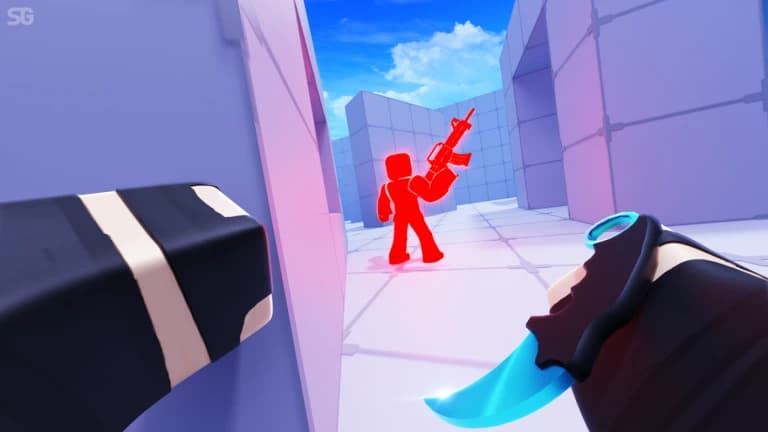
Rivals Script
94 features sa 26 categories, ina-update linggo-linggo.
Available din sa:English·Português·Español·Tiếng Việt·Bahasa Indonesia
Preview ng Rivals script
Ito mismo ang ZekeHub menu, ginawang pang-browser. I-click mo ang mga tab para masubukan — English ang menu sa loob ng game.

Panoorin ang Rivals script
Rivals Script — Silent Aim, RageBot & ESP (New Update) · 5 Sept 2026


Ang Rivals ay mabilisang duels, 1v1 man o team, kung saan madalas nadedesisyunan ang round sa iilang segundo ng aim. Mahalaga ang reaction time, ang loadout mo at kung sino ang unang nakakita sa kalaban. Dito pumapasok ang ZekeHub Rivals script: may Silent Aim at Aim Assist para sa malinis na tama, RageBot na kusang bumabaril habang naka-hold ang activate key, at prediction para hindi ka sumablay sa mga gumagalaw na target.
Bukod sa aim, may gun mods ka rin gaya ng No Recoil, No Spread, Fire Rate Boost at Instant Scope, pati melee mods tulad ng No Melee Cooldown at Infinite Double Jumps. Kumpleto ang player ESP na may box, health bar, chams at off-screen arrows, kaya alam mo palagi kung nasaan ang bawat player. Para ito sa mga gustong mas consistent ang bawat duel, at sa mga mahilig mag-ayos ng lighting at visuals ng mapa.
Ano ang kayang gawin ng Rivals script
- Silent AimTumatama ang bala sa target kahit hindi eksakto ang crosshair mo, at may Projectile TP para sa projectile weapons.
- Aimbot at Aim AssistPumili sa full aimbot o sa mas banayad na aim assist na tumutulong lang i-track ang kalaban.
- RageBotKusang bumabaril sa kasalukuyang target mo habang naka-hold ang activate key.
- Aim SettingsPrediction, visible check, team check, FOV at Anti Katana Deflect para kontrolado kung sino at saan ka tatama.
- Gun ModsNo Recoil, No Spread, Fire Rate Boost, Auto Reload at Force Full-Auto para sa bawat baril.
- Player ESPBox, 3D box, health bar, pangalan, weapon at distance ng bawat player, kasama ang chams at off-screen arrows.
- MovementForce Sprint, WalkSpeed, Velocity Fly at No Knockback para mas mabilis at mas kontrolado ang galaw mo.
- Auto QueueKusang pumipila sa susunod na match, at may Auto Pick Weapons para hindi ka na pumipili ng loadout tuwing round.
Lahat ng 94 features ng Rivals
Eksaktong nakasulat ang pangalan ng bawat feature gaya ng nasa in-game menu, sa English.
Ipakita ang lahat ng 94 featuresBuksanIsara
Silent Aim
- Silent Aim
- Hit Chance (0% to 100%, default 100%)
- Projectile TP
- Projectile TP Keybind (default key None)
Aim Assist
- Aim Assist
- Strength (1% to 100%, default 20%)
- Aimbot
- Keybind (default key MB2)
- Smoothing (2 to 15, default 5)
RageBot
- RageBot — Automatically shoots your current target while the activate key is held
- Activate (default key V)
- RageBot Toggle (default key X)
- Auto Switch Weapon
- Server Lock — Sticks you to their head on the server, even if they lag or desync
- Origin (default Real) — Spoofed sends fake origin numbers instead of your real spot, needs Server Lock on
- Reload Hide — Hides you far away while you reload so nobody can hit you
- Void Timing (0 to 1.5, default 0.1) — For void spammers, times how long they stay out and shoots this early before they come back
- Idle Position (default Void)
- Idle Range (default Extreme) — Extreme is far out of the map, Ultra is even further, Custom uses your own numbers, Hide sits under the map instead
- Hide Offset (-20 to 0, default -5) — How far below the map to sit
- Min Y (-100000 to -1000, default -50000)
- Max Y (-100000 to -1000, default -10000)
- XZ Range (1000 to 100000, default 10000)
Aim Settings
- Targeting Mode
- Mode (default Closest)
- Manipulation — Shoots from a spot next to you if the target is behind a wall. Also tries shooting through the floor
- Manipulation Keybind (default key None)
- Manipulation Amount (10% to 100%, default 95%) — How far from you it can shoot from, as a % of the max the server allows
- Silent Aim Point Blank — Makes Silent Aim use point blank too. RageBot always does, so the offset and settle sliders apply either way
- Point Blank Keybind (default key None)
- Head Offset (0 to 5, default 0.5)
- Under Offset (-5 to 0, default -3)
- Settle Time (0s to 0.25s, default 0.067s)
- Void Chase — Follows void spammers out to their fake position instead of ignoring them
- Exposure Snipe — Void spammers have to come back to real ground to shoot, this targets them the moment they do
- Team Check
- Visible Check
- Dead Check
- Anti Katana Deflect
- Prediction
- Target Body Parts
- Parts (default Head)
- Use FOV
- FOV Size (1 to 1000, default 500)
- Draw FOV Circle
- Show Target Line
Gun Mods
- No Bullet Waste
- No Recoil
- Reduction (0% to 100%, default 100%)
- No Spread
- Fire Rate Boost
- Boost Amount (0% to 100%, default 50%)
- Auto Reload
- Force Full-Auto
- Instant Scope
- Aim Speed Mod — Changes how fast you aim down sights
- Aim Speed (50% to 500%, default 300%)
Melee Mods
- No Melee Cooldown
- Dash Cooldown — Reduces the dash cooldown on every item that has one
- Cooldown Multiplier (0 to 1, default 0)
- Instant Grenade Explode
- Infinite Double Jumps — Removes the double jump limit
Bullet Visuals
- Bullet Tracers
- Lifetime (0.5s to 5s, default 1.5s)
- Width (0.01 to 0.3, default 0.05)
- Bullet Hit Markers
- Hit Notification
- Grenade Trajectory
- Max Time (2s to 10s, default 5s)
Movement
- Force Sprint
- WalkSpeed Modifier
- Multiplier (1 to 3, default 1.5)
- Custom Sliding
- Slide Speed (10 to 100, default 50)
- Velocity Fly
- Fly Speed (10 studs/s to 200 studs/s, default 50 studs/s)
- No Knockback
Effects
- No Smoke
- Anti Freeze
- No Flashbang
- Device Spoof
- Device (default MouseKeyboard)
Hit Sound
- Custom Hit Sound
- Sound (default Bonk)
- Custom Sound ID — Text input - numeric sound ID, overrides the selected sound
Anti-Aim
- Anti-Aim
- Pitch (-180° to 180°, default 0°)
- Yaw (-360° to 360°, default 0°)
- Fake Position
- Fake Position Keybind (default key G)
Safety
- Spectator Warning
- Moderator Detection
Custom Nametag
- Custom Nametag
- Username (default Player) — Text input
- Win Streak (0 to 1000, default 0)
- Level (1 to 1000, default 1)
- Controls Display (default MouseKeyboard)
Auto Weapon Picker
- Unrestricted Classes
- Auto Pick Weapons
- Allow Any Slot
- Primary
- Secondary
- Melee
- Utility
Auto Queue
- Auto Queue
- Game Mode
Auto Ban
- Auto Ban
- Ban Maps
- Maps to Ban
- Ban Weapons
- Weapons to Ban
Player ESP
- Enable ESP
- Team Check
- Box
- Box Outline
- Box Fill
- Fill Transparency (0 to 1, default 0.5)
- 3D Box
- Health Bar
- Health Bar Outline
- Health Text
- Name
- Weapon
- Distance
ESP Extras
- Tracers
- Origin (default Bottom)
- Tracer Outline
- Chams
- Fill Transparency (0 to 1, default 0.5)
- Outline Transparency (0 to 1, default 0)
- Visible Only
- Off-Screen Arrows
- Size (5 to 50, default 15)
- Distance (50 to 500, default 150)
- Arrow Outline
Cosmetics
- Unlock Cosmetics
- Unlock Types (default Skin) — Multi-select (default all)
- Cosmetics Picker — Opens a window to browse every weapon and equip its skins, wraps, charms and finishers
Emote Player
- Play Emote
- Animation ID — Text input - numeric animation ID
- Speed (0.1 to 5, default 1)
Lighting
- Ambient — Overrides this lighting colour
- OutdoorAmbient — Overrides this lighting colour
- ColorShift_Bottom — Overrides this lighting colour
- ColorShift_Top — Overrides this lighting colour
- FogColor — Overrides this lighting colour
- FogEnd
- FogEnd (0 studs to 1000 studs) — Starts at the map's current value
- FogStart
- FogStart (0 studs to 1000 studs) — Starts at the map's current value
- EnvironmentSpecularScale
- EnvironmentSpecularScale (0 to 1) — Starts at the map's current value
- EnvironmentDiffuseScale
- EnvironmentDiffuseScale (0 to 1) — Starts at the map's current value
- ExposureCompensation
- ExposureCompensation (-5 to 5) — Starts at the map's current value
- ShadowSoftness
- ShadowSoftness (0 to 2) — Starts at the map's current value
- Brightness
- Brightness (0 to 10) — Starts at the map's current value
- ClockTime
- ClockTime (0h to 24h) — Starts at the map's current value
- GlobalShadows — Starts at the map's current setting
- Technology (default ShadowMap) — Defaults to the map's current lighting technology
- Reset Lighting — Restores the original lighting and turns every override off
Post FX
- Bloom
- Intensity (0 to 3, default 0.5)
- Size (0 to 56, default 24)
- Threshold (0 to 2, default 0.8)
- Blur
- Size (0 to 56, default 10)
- Color Correction
- Brightness (-1 to 1, default 0)
- Contrast (-2 to 2, default 0)
- Saturation (-1 to 1, default 0)
- Sun Rays
- Intensity (0 to 1, default 0.25)
- Spread (0 to 1, default 1)
- Reset All Effects — Reset all post-effects to defaults
Atmosphere
- Custom Atmosphere
- Density (0 to 1, default 0.3)
- Offset (0 to 1, default 0)
- Glare (0 to 1, default 0)
- Haze (0 to 10, default 0)
Skybox
- Custom Skybox
- Skybox Asset ID — Roblox asset ID for skybox
Settings
- Unload — Unload the script
- Menu Keybind
- Menu keybind (default key End)
Interface
- Watermark — Shows the stats watermark on screen
- Keybinds — Shows the active keybinds list on screen
Mga madalas itanong tungkol sa Rivals script
01Magkano ang Rivals script?
Kasama ang Rivals script sa ZekeHub hub key: £6.99 para sa 30 araw, o £18.99 na isang bayad lang para sa Lifetime. Iisang key lang ito para sa lahat ng script sa hub. Walang free version, at puwede kang magbayad gamit ang card, PayPal, crypto o Robux.
02Anong executor ang kailangan ko?
Gumagana ito sa lahat ng major na Roblox executor. Tingnan ang Executors page ng site para makita kung alin ang gumagana sa ngayon, dahil nagbabago iyon paminsan-minsan. I-inject mo ang executor habang nasa server ka, tapos i-paste ang loadstring.
03Gaano kadalas ina-update ang script?
Linggo-linggo. Laging kinukuha ng loader ang pinakabagong version, kaya hindi mo na kailangang mag-download ulit pagkatapos ng update ng Rivals.
04Naka-Filipino ba ang menu sa loob ng game?
Hindi, English ang menu. Pero mga karaniwang gaming term lang naman ang gamit, gaya ng Silent Aim, ESP at No Recoil, kaya madali pa rin itong sundan.
05Ano ang pinagkaiba ng Silent Aim at RageBot?
Sa Silent Aim, ikaw pa rin ang bumabaril, pero dinadala ang bala sa target mo. Ang RageBot naman ang bumabaril para sa iyo habang hawak mo ang activate key. Pareho silang sumusunod sa Aim Settings, gaya ng visible check at target body parts.
More questions? See the full FAQ →